Your passwords in one file.
On your own disk.
Kivarion is a free, open-source desktop password manager for .kdbx vaults. No account, no cloud, no subscription — the vault is a single encrypted file, and you decide where it lives.
Why Kivarion
Your data, your storage
The vault is one .kdbx file on your disk. Kivarion has no servers and never sees your data. Keep the file in a local folder, on an encrypted drive, or in a sync folder you already use.
No account, no subscription
There is nothing to sign up for and nothing to pay for. The app works fully offline. The only optional network request is fetching website icons, and one switch in Settings turns it off.
Open format, no lock-in
Kivarion reads and writes standard KDBX 4, so your vault keeps working with other apps that open .kdbx files. Leaving Kivarion never requires an export or a migration.
Open source
The whole application is GPL-3.0 and auditable — the encryption, the file handling and everything in between.
Everything you need, nothing you don't
Flexible unlock
Open a vault with a master password, a key file, or both. The key file is remembered per vault.
Fingerprint unlock on macOS
Optional, and only when you ask for it — Kivarion never prompts on its own.
Three-column layout
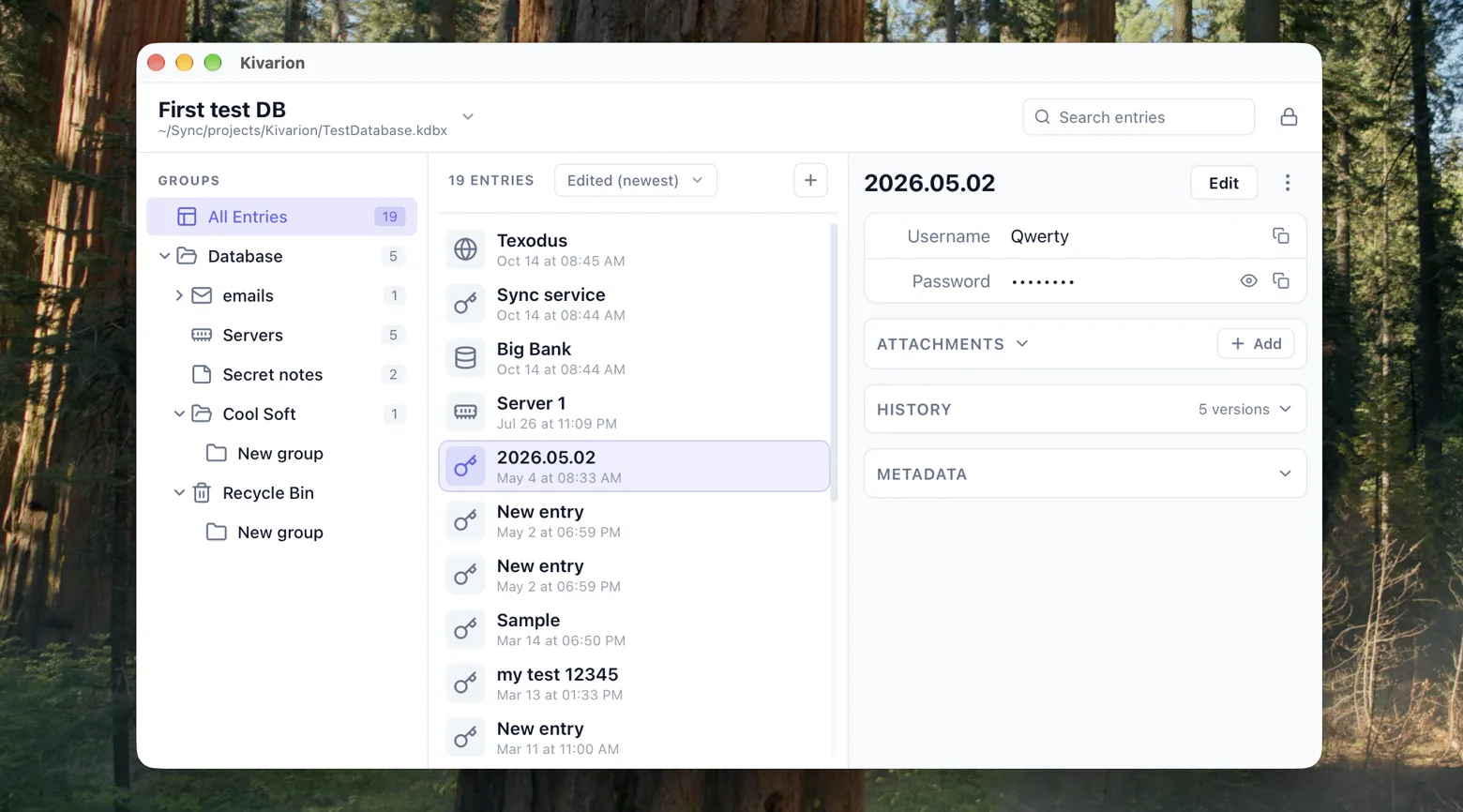
Group tree, entry list and a resizable details panel. Drag entries between groups.
Search across the vault
Title, username, URL, notes and custom fields, in every group at once. Passwords and hidden fields are never searched.
Password generator
Configurable options, and revealed passwords are colour-coded by character type, so look-alike characters are easy to tell apart.
Entry history
Every edit keeps the previous version — up to 10 per entry. See what changed and restore any earlier state.
Recycle Bin
Deleted groups and entries can be restored to where they came from.
Attachments
Add, preview, rename and export files stored inside an entry.
Auto-save and backups
Every change is written to the file right away, and rotating encrypted backups sit next to the vault.
Icons
The standard icon set, custom icons stored in the vault, and optional website icons.
New vaults
Create a new .kdbx vault right in the app and change its master password or key file later.
Light and dark
Light, dark and system themes.
How your vault is protected
- Proven cryptography. KDBX 4 encryption (AES-256 or ChaCha20) with Argon2 key derivation — a memory-hard function that is much harder to brute-force than older ones. Argon2 runs in the native backend, so the window stays responsive while a large vault unlocks.
- Safe saves. Every save is atomic: write to a temporary file, flush it to disk, then replace the original. Before overwriting, Kivarion checks whether the file was changed by another program.
- No direct file access from the interface. All file operations go through dedicated native commands, and only on a file you picked yourself.
- Your master password is not stored — unless you turn on fingerprint unlock. Then it is kept in the macOS Keychain, protected by the system, and read only after a successful fingerprint check.
- Website icons are optional. When they are on, only the entry's domain is sent to a public icon service. Turn them off in Settings and nothing leaves your machine.
What Kivarion doesn't do
So you know before you download:
- No built-in cloud sync. To use the vault on several computers, put the file in a sync folder you trust.
- No browser extension and no autofill.
- No mobile apps. Kivarion is for desktop: macOS, Windows and Linux.
- No shared vaults or team accounts.
Download Kivarion 1.6.0
Free. Released August 15, 2026.